
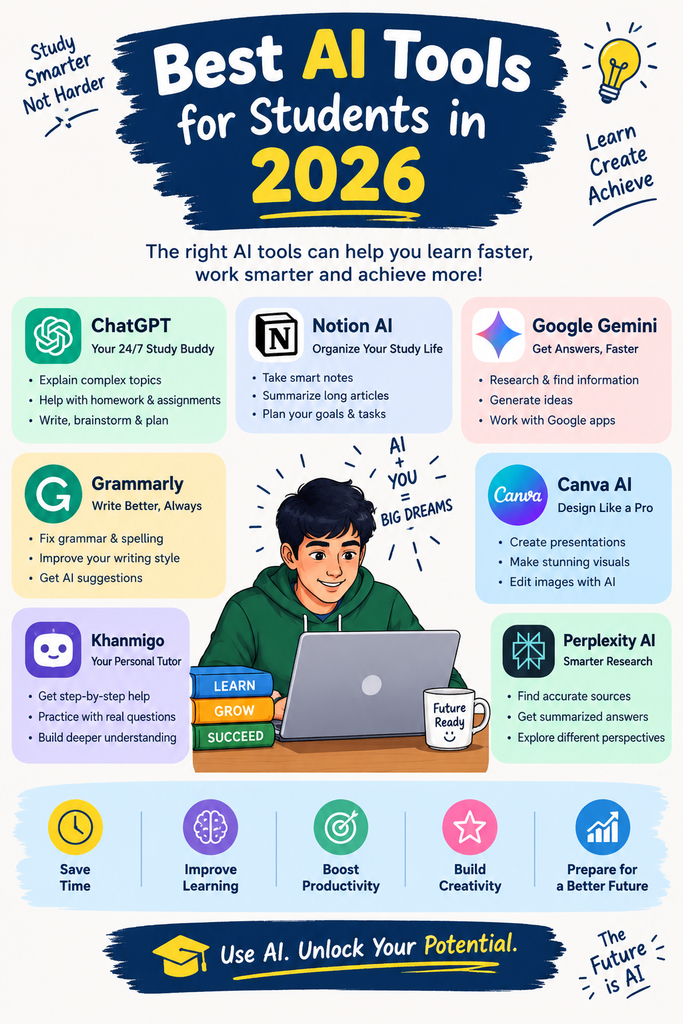
Artificial Intelligence has become a part of modern education. Students can now use AI tools to understand ideas write better notes solve challenges learn new languages make presentations and organize their study time better.
But there are many AI tools available it can be hard to pick the ones that really work. In this guide we will look at some of the AI tools for students, in 2026 and tell how they can assist with daily learning.
1. ChatGPT
OpenAI’s ChatGPT is one of the versatile AI tools for students.
Students can use it to:
Explain topics in simple language
Create study notes
Generate practice questions
Summarize information
Brainstorm project ideas
Improve writing
Practice languages
Prepare for exams
For example: simply asking for an answer to a physics question you can ask ChatGPT to explain the concept step-by-step like a Class 12 student.
Best, for: Studying, explanations, writing and brainstorming.

2. Google Gemini
Google Gemini is another AI assistant for students.
It can support students with research, brainstorming, writing tasks coding help and understanding topics.
Since it connects well with Google’s tools and services it’s especially easy to use for students who already rely on Google for work or school.
Best, for: research, writing, brainstorming and general study help.
3. Microsoft Copilot
Microsoft Copilot is very useful for students who use Microsoft products a lot. Microsoft Copilot is a tool for students who use Microsoft products heavily.
Microsoft Copilot helps with writing, research, summarizing and many productivity tasks. Microsoft Copilot lets students organize ideas before they start assignments or presentations.
Microsoft Copilot is best for productivity, writing and Microsoft-based workflows. Microsoft Copilot is the choice, for students who rely on Microsoft workflows.
4. Perplexity
Perplexity is built around AI-based search and research tools.
Of going through many web pages on their own students can ask a question and get a short answer along with sources they can look at more.
This is very helpful when working on a school or college assignment.
Best, for: Doing research and finding references.

5. Grammarly
Grammarly uses intelligence to help improve writing.
Students can use it to find:
– Grammar mistakes
– Spelling errors
– sentences
– Punctuation problems
– Writing-style issues
It can be especially helpful when preparing essays, emails, assignments and applications.
Best for: English writing and proofreading.
6. Canva AI
Canva is really helpful for students who have to make projects that look nice and eye-catching.
Its tools that use intelligence can help come up with ideas and make designs for:
Presentations
Posters
Infographics
Social media graphics
School projects
You don’t have to be really good at graphic design to start using it.
Best, for: Presentations, posters and projects.
7. NotebookLM
Googles NotebookLM helps when you already have study material and want to make the most of it.
You can upload supported files and let the AI assist in summarizing and explaining the content.
For instance you could convert a chapter into shorter easier-to-review notes or ask questions about the material you’ve uploaded.
Best, for: Notes, documents and revision.
8. QuillBot
QuillBot is useful for rewriting text and improving how it sounds.
Students can use it when they want to make their writing clearer or swap out words while keeping the meaning.
Best, for: Rewriting and improving writing.
9. Wolfram|Alpha
Wolfram Alpha is really helpful when it comes to math and other technical topics.
It can assist students in looking into math problems, equations and science ideas.
For students who like math it can be a friend for verifying calculations and looking into different problems.
Best, for: Math and science.
10. Quizlet
Quizlet can help students turn study material into revision activities. I often see students using Quizlet to make learning fun.
Flashcards and practice questions can make memorizing definitions, formulas, vocabulary and important facts easier. Flashcards help me remember better.
Best for: Revision and memorization. Quizlet is great, for that.
—
How Students Should Use AI
AI should be used as a study assistant, not as a replacement for learning.
For example, instead of asking:
> “Give me the answer.”
Try asking:
> “Explain this concept in simple language and then give me 5 questions to test my understanding.”
This approach helps you actually learn the topic.
You can also use AI to create a personalized study routine, generate mock tests and identify areas where you need more practice.
Benefits of AI for Students
AI tools can help students:
📚 Understand difficult concepts
⏰ Save study time
📝 Create better notes
🧠 Practice through quizzes
✍️ Improve writing
🎨 Create projects and presentations
🔎 Research topics
💡 Generate new ideas
Things Students Should Be Careful About
AI isn’t always correct. It can sometimes provide incorrect information.
Therefore students should verify facts using textbooks, teachers and reliable sources especially for exams and academic assignments.
Students should also avoid copying AI-generated answers. Understanding the topic yourself is more valuable, than submitting an answer you don’t understand.
Conclusion
I have seen AI changing the way students learn in 2026. Tools such, as ChatGPT, Gemini, Copilot, Perplexity, Grammarly, Canva, NotebookLM, QuillBot, Wolfram|Alpha and Quizlet can make studying more efficient and interactive.
The best approach is to combine AI with learning. Use AI to explain, practice. Improve learning but make sure you understand the final answer yourself.
FAQs
1. What are the best AI tools for students in 2026?
Some of the AI tools for students in 2026 include ChatGPT, Google Gemini, Claude, Perplexity, Grammarly and Notion AI. These tools can help with research, writing, studying, note-taking and productivity.
I’ve tried a few of them myself. They really make schoolwork easier. ChatGPT is great for explaining topics in simple words. Google Gemini helps me find reliable sources fast. Claude gives answers and doesn’t rush. Perplexity is my go-to for research. It shows sources right away. Grammarly catches my spelling and grammar mistakes before I submit anything.. Notion AI helps me organize my notes and study plans in one place.
They’re not magic. They do save time and help me stay on track. I use them every week. I’ve noticed I’m finishing assignments faster and understanding things better. They’re not meant to do the work for me. They’re good helpers when I’m stuck or short, on time.
2. How can AI tools help students with their studies?
AI tools can help students understand subjects break down long content make study notes come up with practice questions make writing better and save time when doing research and assignments. AI tools can help students understand subjects break down long content make study notes come up with practice questions make writing better and save time when doing research and assignments.
3. Are AI tools safe and reliable for students?
AI tools can be helpful. Students need to check important information carefully. Sometimes AI gives answers that’re wrong or not up to date. It’s also important to not share details with AI tools. Staying safe means being careful, about what you tell the AI.
4. Can students use AI tools for assignments and homework?
Yes students can use AI tools for brainstorming, explanations, research assistance, proofreading and learning.. They should always check their school or colleges AI policy. They must not submit AI-generated work, as their own if it is not allowed. It is important to use these tools and keep their own work honest.
5. Which AI tool is best for students?
I find that the best AI tool depends on the students needs. For learning and brainstorming the AI tool ChatGPT and the AI tool Gemini work. For research the AI tool Perplexity is helpful. For writing the AI tool Grammarly can improve your work. For notes and productivity the AI tool Notion AI is useful.